10 Benefits of Virtualization in Cloud Computing for 2026

By Maddy Osman
Senior Content Marketing Manager at DigitalOcean
- Updated:
- 17 min read
Before the era of the cloud, a team building a real-time sensor analytics app faced a familiar slog. They’d spec out servers, submit purchase orders, wait weeks for hardware delivery, then coordinate with colocation facilities for rack installation and network configuration. Every layer of the stack required its own dedicated physical machine. Replicating that stack for load testing meant doubling the hardware budget before any real data hit the system.
Today, infrastructure is an API call rather than a procurement cycle. Capacity planning is a response to metrics rather than a forecast made months in advance. That same app can be provisioned as virtual machines in under an hour, with staging environments cloned from snapshots and compute scaled as new clients onboard. Some organizations still run bare metal, like trading firms where hypervisor overhead cuts into latency-sensitive margins or healthcare systems interpreting HIPAA physical safeguards as requiring dedicated hardware. But for most teams, the benefits of virtualization allow them to move at the pace of their product roadmap rather than their hardware vendor’s delivery schedule.
Key takeaways:
- Cloud virtualization enables compute, storage, and networking resources to be abstracted from physical hardware for greater flexibility and control.
- By isolating workloads into virtual machines, organizations gain cost efficiency, stronger security boundaries, faster deployment, and easier scaling without managing physical servers.
- Choosing the right virtualization approach depends on your workload needs, including performance requirements, security isolation, operating system compatibility, scalability expectations, and operational complexity.
- DigitalOcean supports virtualization through Droplets for VMs, VPC for private networking, Volumes for block storage, snapshots for environment replication, and managed Kubernetes for container orchestration.
What is cloud computing virtualization?
Virtualization is a technology that creates a virtual version of a computing resource—like an operating system, server, storage device, or network. It enables a single physical machine to host multiple isolated virtual environments, each running its own operating system and applications, without interfering with one another. By separating computing resources from the underlying hardware, various types of virtualization provide greater flexibility, scalability, and efficiency in using IT infrastructure.
This technology forms the foundation of server virtualization in cloud environments, where virtualized resources are pooled together and delivered over the internet, enabling users to access computing power, storage, and applications on demand, without managing on-premises resources. Cloud providers like DigitalOcean facilitate virtualization by offering virtual machines, private networking, block storage, and container orchestration as managed services.
Core virtualization concepts
Virtualized infrastructure has a few building blocks worth understanding, along with related technology that comes up in the same conversations. Virtualization relies on hypervisors to abstract physical hardware and create virtual machines that run their own full operating systems. Containers solve some of the same problems—isolation, portability, efficient resource use—but work differently. Instead of virtualizing hardware, containers share the host operating system’s kernel and isolate applications at the process level. Both show up in modern infrastructure, so knowing how they differ helps when deciding what to use where.
What are virtual machines?
Virtual machines (VMs) are software-based emulations of physical computers that run their own operating systems and applications independently. By using virtual machines in cloud computing, organizations run multiple isolated systems on a single physical server, improving hardware utilization and efficiency. Because VMs are abstracted from the underlying hardware, they are highly portable and are provisioned, moved, or scaled in minutes. For example, DigitalOcean Droplets provide developers with dedicated, virtualized compute instances to host everything from web servers to complex AI workflows.
What is a hypervisor?
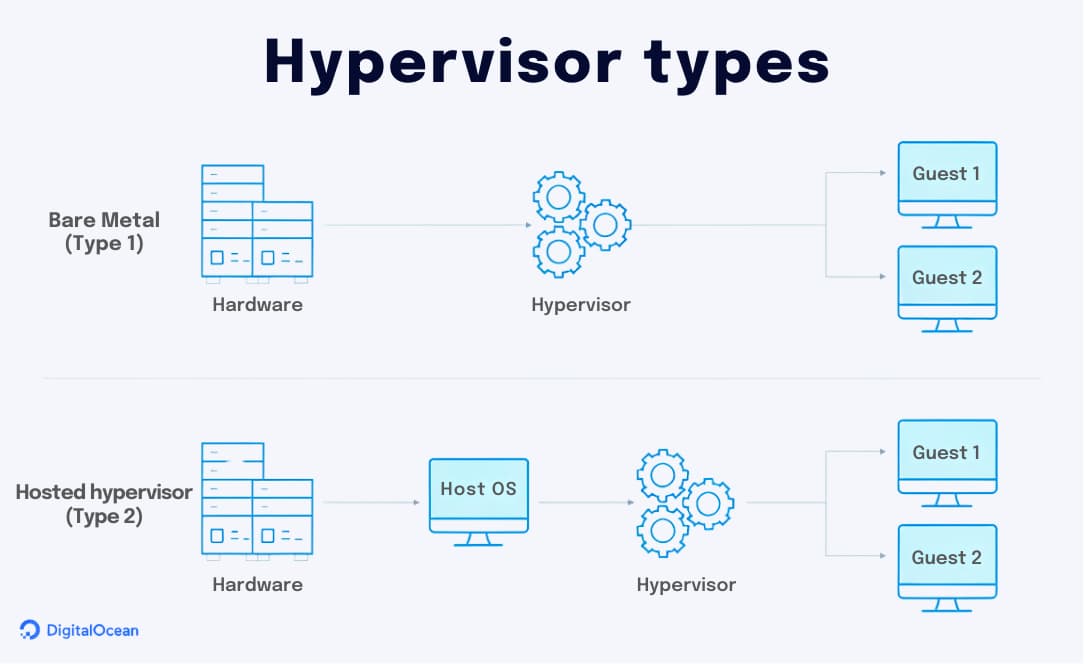
A hypervisor is a specialized software layer that creates and runs virtual machines by isolating them from the underlying physical hardware. It acts as a resource manager, dynamically allocating CPU, memory, and storage—and in advanced AI workflows, facilitating GPU virtualization—to ensure each VM operates independently without interference.
Many cloud platforms use a bare metal hypervisor, which installs directly on the physical server to provide superior performance and security compared to hosted versions. This technology is the engine behind hypervisor cloud computing, allowing providers to securely pool and allocate resources to users on demand.
What are containers?
Containers are lightweight software packages that bundle an application’s code with all its necessary dependencies, ensuring it runs consistently across different environments. Unlike virtual machines that virtualize hardware, containers share the host’s operating system kernel, allowing them to start in seconds with minimal resource overhead. You can use container-based services like DigitalOcean Kubernetes (DOKS) to manage these workloads efficiently alongside your traditional virtualized infrastructure. This makes them the ideal choice when you need to maximize server density and scale microservices rapidly in response to user demand.
Virtualization vs containers
The primary difference between virtualization and containers lies in the level of abstraction: virtualization isolates at the hardware level by including a full guest operating system in every VM, while containers isolate at the process level by sharing the host’s OS kernel. This architectural difference means that virtual machines provide stronger security boundaries for legacy apps or heavy-duty databases, but come with higher resource overhead. Conversely, containers are lightweight and start in seconds, making them the superior choice for microservices and rapid horizontal scaling.
So, when should you use each one?
Choose virtual machines if your workload requires a specific operating system kernel, full root access to the entire stack, or hosts complex monolithic applications. They are the industry standard for legacy systems and applications that must meet strict security compliance through deep, hardware-level isolation. In contrast, containers are the best choice for maximizing server density and moving code seamlessly between development and production environments. Use them to build modern microservices that need to scale horizontally—so you can spin up dozens of identical instances instantly to handle traffic spikes without the overhead of multiple operating systems.
Containers take a different approach than virtual machines. Instead of virtualizing full operating systems, containers share the host OS for faster startup and lighter resource use. This introduction explains what containers are, how they differ from VMs, and when each approach makes sense in a virtualized environment.
How does virtualization work?
With hypervisors and virtual machines defined, the next question is how they actually work together. The short answer: hypervisors sit on physical hardware and carve it up into isolated virtual environments that behave like standalone servers.
Here’s the longer answer:
- Hypervisor installation: A specialized software called a hypervisor is installed on the physical server. The hypervisor manages and allocates the server’s resources, such as CPU, memory, and storage, among the VMs. A bare metal hypervisor controls both the hardware and one (or more) guest operating systems, which enables efficient resource use, security, and scaling.
- Virtual machine creation: The hypervisor creates VMs, each running its own operating system and applications. Virtual machines in cloud computing are isolated from one another, ensuring that any issues or changes in one VM do not affect the others.
- Resource allocation and management: The hypervisor dynamically allocates the physical server’s resources to the VMs based on their requirements. This allows for efficient utilization of resources and prevents any single VM from monopolizing the entire server.
- Virtual network setup: Virtualization also enables the creation of virtual networks, allowing VMs to communicate with each other and with external networks as if they were connected to a physical network.
Navigating the cloud virtualization ecosystem
Managing a virtualized environment requires more than just raw compute power; it requires a suite of automation and monitoring tools. By using management platforms like the DigitalOcean Control Panel or Terraform, administrators can programmatically create Droplets, configure Virtual Private Clouds (VPCs), and monitor performance in real-time.
To help you navigate these components, the table below maps virtualization concepts to their DigitalOcean services and hyperscaler equivalents:
| Virtualization Concept | DigitalOcean Service | Hyperscaler Equivalent | Purpose |
|---|---|---|---|
| Virtual Machine (VM) | Droplet | EC2/Azure VM/Computer Engine | Provides a standalone virtual server with its own OS and dedicated resources. |
| Containers | DigitalOcean Kubernetes (DOKS) | ECS/EKS / AKS / GKE | Packages code and dependencies to share the host OS kernel, allowing for faster startups and high-density microservices. |
| Hypervisor | KVM (Internal) | Nitro/Hyper-V/Hardened KVM | The invisible software layer that runs your virtual machines on physical hardware. |
| Virtual Networking | VPC (Virtual Private Cloud) | AWS VPC/Azure VNet/Cloud VPC | Creates an isolated, private network for your VMs to communicate securely. |
| Virtual Block Storage | Volumes | EBS/Azure Disk/Persistent Disk | Adds extra “virtual hard drives” to your virtual machines that exist independently of the server. |
| Image/Snapshot | Custom Images | AMI/Managed Image/Custom Image | A “saved state” of a VM used to deploy identical copies of a server instantly. |
Virtualization isn’t one-size-fits-all. Different VM types are designed for different workloads—and choosing the right one can improve performance while keeping costs predictable. Understand the main types of virtual machines and when to use them, helping you get more value from your virtualized infrastructure.
10 benefits of virtualization in cloud computing
If you’re running production workloads in the cloud, virtualization shifts much of the operational burden to your cloud provider. They maintain the hardware, patch the hypervisors, and manage physical security, often backed by SLAs that guarantee uptime and hold them accountable when something goes wrong. You focus on your application layer.
1. Cut infrastructure costs with pay-as-you-go savings
Instead of purchasing physical hardware every time your needs expand, virtualization makes it possible to create a new virtual machine within your existing infrastructure. This cuts down your initial investment while also reducing ongoing expenses related to energy consumption, maintenance, and even space required to store all your physical hardware.
Of course, running workloads in the cloud still costs money, and bills from hyperscalers like AWS can spiral quickly without oversight. Managing these costs for better cloud ROI typically involves strategies like:
- Right-sizing instances to match actual workload requirements instead of over-provisioning
- Committing to reserved instances or savings plans for predictable workloads in exchange for lower hourly rates
- Auto-scaling resources to meet demand rather than paying for idle capacity
- Using spot or preemptible instances for fault-tolerant workloads like batch processing or CI/CD pipelines
- Tagging resources by team or project to track spend and hold teams accountable
The savings from virtualization are real, but they require active cloud cost management to realize.
DigitalOcean is known for predictable, straightforward pricing that makes cost management simpler from the start. If you’re already on AWS or Azure, these AWS cost optimization and Azure cost optimization tips can help keep your cloud spend under control.
2. Deploy your applications faster
Virtualization speeds up more than just server provisioning. Pre-configured VM images and templates let teams codify their stack once and replicate it on demand, which accelerates nearly every stage of the development lifecycle:
-
New environments: Spin up a complete development, staging, or production environment in minutes instead of requisitioning and configuring physical servers over weeks
-
Environment cloning: Duplicate an existing setup from a snapshot to create an identical testing environment without manual configuration
-
Regional expansion: Deploy your application to a new geographic region by replicating your VM configuration to a different data center
-
Blue-green deployments: Run two identical production environments side by side, routing traffic to the new version only after validation
-
Rollbacks: Restore a previous snapshot if a deployment fails, getting back to a known working state without rebuilding from scratch
-
Developer onboarding: Give new engineers a fully configured development environment on day one instead of spending their first week setting up local infrastructure
The cumulative effect is that teams ship more frequently with less risk. When standing up a new environment takes minutes instead of weeks, experimentation becomes cheaper, and iteration cycles tighten.
3. Reduce downtime with built-in redundancy and faster recovery
Virtualization enables point-in-time snapshots and live migrations so your systems can remain operational even during hardware maintenance or host failures. If a software update fails or a security breach occurs, you can restore a previous “known good” state in minutes, drastically reducing your recovery time compared to the hours or days required to rebuild physical servers.
Cloud providers offer features that make this practical:
- Automated backup schedules that run nightly or hourly without manual intervention, so you always have a recent restore point
- One-click snapshot restores for rolling back a virtual machine to an earlier state in minutes, rather than rebuilding from scratch
- Cross-region replication that copies your data to geographically separate data centers, protecting against regional outages or disasters
- Failover configurations that automatically redirect traffic to a healthy instance when a primary server becomes unresponsive
These capabilities ensure business continuity by making your entire infrastructure portable and easily recoverable.
4. Scale resources instantly to match demand
Scaling a startup shouldn’t feel like you’re Sisyphus pushing a boulder uphill. With cloud scalability, it can be as simple as adjusting a slider on your user interface. Virtualization simplifies adding resources (like CPU power, RAM, or storage)—all you have to do is deploy new virtual machines or expand existing capacities. The best part? You can do this on the fly without waiting for hardware investment and installation.
An additional benefit with virtualization is that you’ll always have the resources you need to support demand during peak times, as well as the ability to scale back (to save costs) when things quiet down. Load balancers make this even smoother by distributing incoming traffic across virtual machines automatically, so no single instance gets overwhelmed as demand fluctuates.
Datacake, a low-code IoT platform, processes 35 million messages per day with a team of just three engineers. By running on DigitalOcean’s managed Kubernetes and databases, they’ve scaled without hiring a dedicated DevOps team.
5. Strengthen security through isolation and centralized controls
Managing your own physical infrastructure means owning every layer of security: patching operating systems, configuring firewalls, monitoring for intrusions, managing physical access to data centers, and staying current on compliance requirements. For organizations in regulated industries like healthcare or financial services, this demands dedicated security engineers and ongoing audits. Most teams don’t have that expertise in-house, and the cost of getting it wrong is high.
Virtualization shifts much of this burden to the cloud provider. When you virtualize your physical servers, applications, or networks, each virtual machine operates in its own isolated environment. That means if one cloud security threat hits a virtual machine, it doesn’t automatically compromise all the others. These virtualization security benefits reduce the risk of widespread system impacts from malware or other breaches. This isolation is a fundamental security advantage over traditional shared hosting, where multiple customers’ applications run on the same operating system instance, and a vulnerability in one site can expose others.
Cloud providers also offer built-in security features that would take considerable time and expertise to implement yourself:
| Security feature | What it does |
|---|---|
| Virtual Private Cloud (VPC) | Creates an isolated network where your VMs communicate privately, invisible to other customers on the same physical infrastructure |
| Cloud firewalls | Filter traffic at the network edge before it reaches your VMs, with rules you can update instantly without logging into each server |
| DDoS protection | Absorbs and mitigates volumetric attacks at the provider level, keeping your applications online during traffic floods |
| Managed SSL/TLS certificates | Automates certificate provisioning and renewal, reducing the risk of expired certificates or misconfigured encryption |
| Identity and access management (IAM) | Controls who can access which resources with granular permissions, audit logs, and support for multi-factor authentication |
| Automated backups and snapshots | Creates regular restore points so you can recover from ransomware or accidental deletion without paying a ransom or losing data |
These capabilities certainly don’t eliminate the need for application-level security, but they provide a strong foundation that most teams couldn’t replicate on their own.
6. Conduct safer application testing
Virtualization makes it possible to trial new features, experiment with different configurations, and simulate high-load scenarios without worrying about destabilizing the main system. This freedom helps mitigate risks, improve quality assurance, accelerate testing, and protect existing infrastructure. A team tackling technical debt by migrating from a monolithic app to a microservices architecture, for example, can spin up isolated VMs to prototype the new setup while keeping the existing product running untouched.
The nature of virtualization is that it provides a secure sandbox virtual environment for safer application testing. Developers can create and manage virtual machines independently from the live production environment—testing, patching, and updating systems without unintentionally impacting operations.
7. Simplify resource administration for increased efficiency
Server virtualization adds administrative convenience—your IT team can manage all virtual machines from a single central dashboard. This means deploying, monitoring, and maintaining dozens (or even hundreds) of environments without physically interacting with multiple hardware setups.
On DigitalOcean, this looks like the Control Panel, where you can create Droplets, resize them, view CPU and memory metrics, configure firewalls, and manage snapshots from one interface. For teams that prefer more automation, the DigitalOcean API and CLI facilitate scripting common tasks like spinning up new environments or scaling resources in response to monitoring alerts.
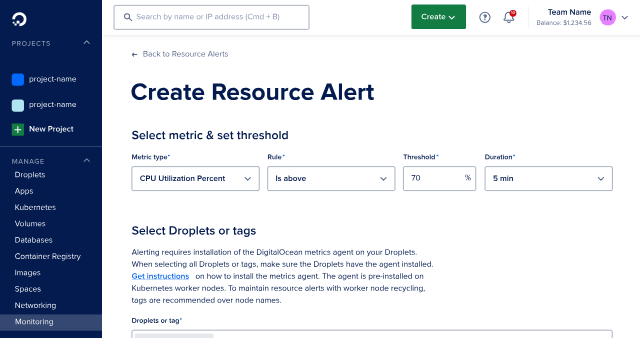
You can also manage infrastructure as code using Terraform, which means your entire setup—Droplets, VPCs, load balancers, databases—can be version-controlled and deployed consistently across staging and production.
As a result, simplifying IT administration frees up valuable time and resources. It also makes it faster to roll out updates, patch software, and scale resources (while simultaneously reducing the likelihood of errors).
8. Migrate your systems with greater ease
Whether you’re upgrading systems, switching to different hardware, or transitioning between data centers, virtualization simplifies the entire process. The entire configuration of a virtual machine (from its operating system to its applications and settings) is captured in a single set of files, meaning you can move a fully operational system without reinstalling and reconfiguring anything from scratch. Faster cloud migration empowers your team to adapt quickly to new hardware advancements, shift workloads to more cost-effective servers, and recover from hardware failures without compromising uptime.
Andres Murcia, founder of Brainz and former CTO of a Latin American ride-sharing platform, cut monthly cloud costs from $250,000 to $90,000 after migrating from AWS to DigitalOcean. His team moved 20 terabytes of data in under four weeks with a single DevOps engineer and reduced deployment times from hours to minutes.
9. Run applications across platforms without rewrites
Virtualization abstracts the application from the underlying hardware and operating system to run in a consistent, isolated virtualized environment. In other words, an application designed for one operating system (such as Windows) can run on a different system (like Linux) through a virtual machine. Or, an application compiled for an older kernel version can operate on modern infrastructure without dependency conflicts.
This matters when your stack spans multiple operating systems or when you’re integrating acquisitions that run different environments. Instead of rewriting or re-architecting, you spin up a VM with the required OS and run the application as-is. The same principle applies to end users: whether they use Macs, PCs, or even mobile devices, virtualization makes your application accessible and functional across all platforms.
10. Extend the life of legacy software without risk
Virtualization enables the creation of virtual environments that mimic older operating systems and hardware setups required by legacy applications. Some software can’t be easily replaced. Consider a manufacturing company still running a shop floor management system built in the early 2000s. The vendor went out of business years ago, the original developers are long gone, and the application only runs on Windows Server 2003. Migrating to a modern alternative would mean retraining staff, rebuilding integrations with ERP and inventory systems, and risking production downtime during the transition.
Virtualization offers a safer path. The company can:
- Run the legacy OS inside an isolated VM on current hardware
- Snapshot the environment regularly in case of corruption or failure
- Keep the legacy system completely walled off from the rest of the network to reduce security exposure
- Buy time to plan a proper migration without the pressure of failing hardware
This approach won’t last forever, but it extends the runway for critical systems while teams evaluate replacements on their own timeline rather than in crisis mode.
Virtualization use cases
Virtualization translates complex technical capabilities into practical business solutions, which include:
- Reliable virtual servers: Virtualization in products like DigitalOcean Droplets provides a dedicated “slice” of a physical server. This architecture ensures your application has its own allocated CPU and RAM, preventing “noisy neighbors” on the same hardware from “starving” your resources or impacting your performance.
- DevOps and sandboxing: Developers use virtual machines to create “sandbox” environments for testing new code. Because these environments are isolated, they can safely simulate crashes or security vulnerabilities without risking the stability of the live production system.
- Disaster recovery: Because a virtual machine is essentially a set of files, businesses can replicate their entire infrastructure to a secondary data center. In the event of an outage, these “cold” images can be powered on in minutes, ensuring near-constant business continuity.
- SaaS delivery: Software-as-a-Service (SaaS) providers use virtualization to manage multi-tenancy. Each customer has their own isolated virtual instance of an application, keeping user data separate and secure while sharing the underlying physical costs.
Limitations and tradeoffs of virtualization
While virtualization offers a slew of benefits, it also introduces specific challenges you must manage:
- Management complexity at scale: As your infrastructure grows, managing hundreds of virtual machines can lead to VM sprawl. You may need specialized expertise and automation tools to ensure unused instances don’t waste your resources.
- The hypervisor as a single point of failure: Adding a virtualization layer introduces the hypervisor as a critical security target. If the hypervisor itself is compromised, every virtual machine running on that physical host could potentially be at risk.
- Hardware-level data risks: Because you still share physical CPU and RAM with other users, sophisticated side-channel attacks could theoretically allow a malicious actor to monitor hardware patterns and leak data from a neighboring virtual machine.
- Troubleshooting complexity: When a physical server lags, problem-solving is fairly straightforward. In a virtualized environment, a performance issue could be in the app, the guest OS, the hypervisor, or the physical hardware. This extra layer makes it harder to find the root cause of a problem.
Cloud virtualization FAQ
What is virtualization in cloud computing?
Virtualization is a technology that creates a virtual version of computing resources like servers, storage, or networks by abstracting them from physical hardware. It allows a single physical machine to host multiple isolated virtual environments, forming the foundation of cloud services delivered over the internet.
What are the main benefits of virtualization?
The primary advantages include significant cost savings by reducing hardware needs and improved security through isolated environments for each virtual machine. Additionally, it offers faster deployment, simplified administration via central dashboards, and better contingency planning through easy backups and snapshots.
How does virtualization improve scalability?
Virtualization allows you to adjust resources like CPU, RAM, or storage on the fly by simply expanding existing capacities or deploying new virtual machines. DigitalOcean simplifies this process further by letting you scale operations through an intuitive interface or API without managing physical hardware.
Does virtualization affect performance?
Virtualization introduces some resource overhead because hypervisor cloud computing must manage and allocate physical hardware to the guest operating systems. However, using high-performance virtualization like the KVM hypervisor on DigitalOcean ensures each virtual machine receives its own dedicated slice of resources to maintain consistent performance.
What is a hypervisor?
A hypervisor is a specialized software layer installed on a physical server that manages and allocates resources like CPU and memory among different virtual machines. For example, DigitalOcean uses the KVM hypervisor to ensure Droplets are efficiently isolated and scaled on top of physical hardware.
Build and scale faster with DigitalOcean’s virtualized infrastructure
Ready to tap into the agility and efficiency of the cloud? DigitalOcean provides a robust, high-performance platform, so you can focus on building applications rather than managing physical hardware.
Enterprises like Ghost have already realized the benefits of a modern virtualization technology cloud platform. While serving over 100 million monthly requests, Ghost found that their legacy dedicated servers required a two-month lead time for expansion. By migrating to DigitalOcean, they moved to an on-demand scaling model that reduced wait times from months to minutes.
DigitalOcean makes it easy to replicate this success through practical virtualization:
- Droplets as high-performance VMs: When you spin up a Droplet, our orchestration layer instructs the hypervisor to carve out dedicated CPU, RAM, and SSD storage. This gives you a virtualized environment that behaves exactly like a physical server with full root access.
- Software-Defined Networking (SDN): Virtualization at DigitalOcean extends beyond servers to your entire network. Use DigitalOcean VPC to simulate routers and switches, creating complex, secure network topologies without ever touching a physical cable.
- Automated management: You don’t need to be a hypervisor expert to manage your infrastructure. The DigitalOcean Control Panel and API act as your management tools, automating the configuration and monitoring of your virtual environment so you can scale from one Droplet to hundreds with a few clicks.
Whether you’re an AI startup looking to innovate with GPU virtualization or a growing business aiming to optimize costs, DigitalOcean offers the flexibility and predictability to meet your needs. Don’t let hardware limitations hold you back—unlock a new level of operational agility today.
About the author

Maddy Osman is a Senior Content Marketing Manager at DigitalOcean.
Start building today
From GPU-powered inference and Kubernetes to managed databases and storage, get everything you need to build, scale, and deploy intelligent applications.
