Evaluate your AI agents faster and more effectively

By Grace Morgan
- Updated:
- 3 min read
Evaluating AI agents can be tricky, especially when your tools aren’t built around how you think and work. That’s why we’re excited to announce that we’ve updated our agent evaluations experience in the DigitalOcean Gradient™ AI Platform. These improvements make it faster and easier to evaluate your AI agents, understand results, and debug issues.
What’s changed for agent evaluations?
The original evaluations feature was powerful but presented friction points that made it hard for developers to adopt. This redesign tackles those challenges head-on:
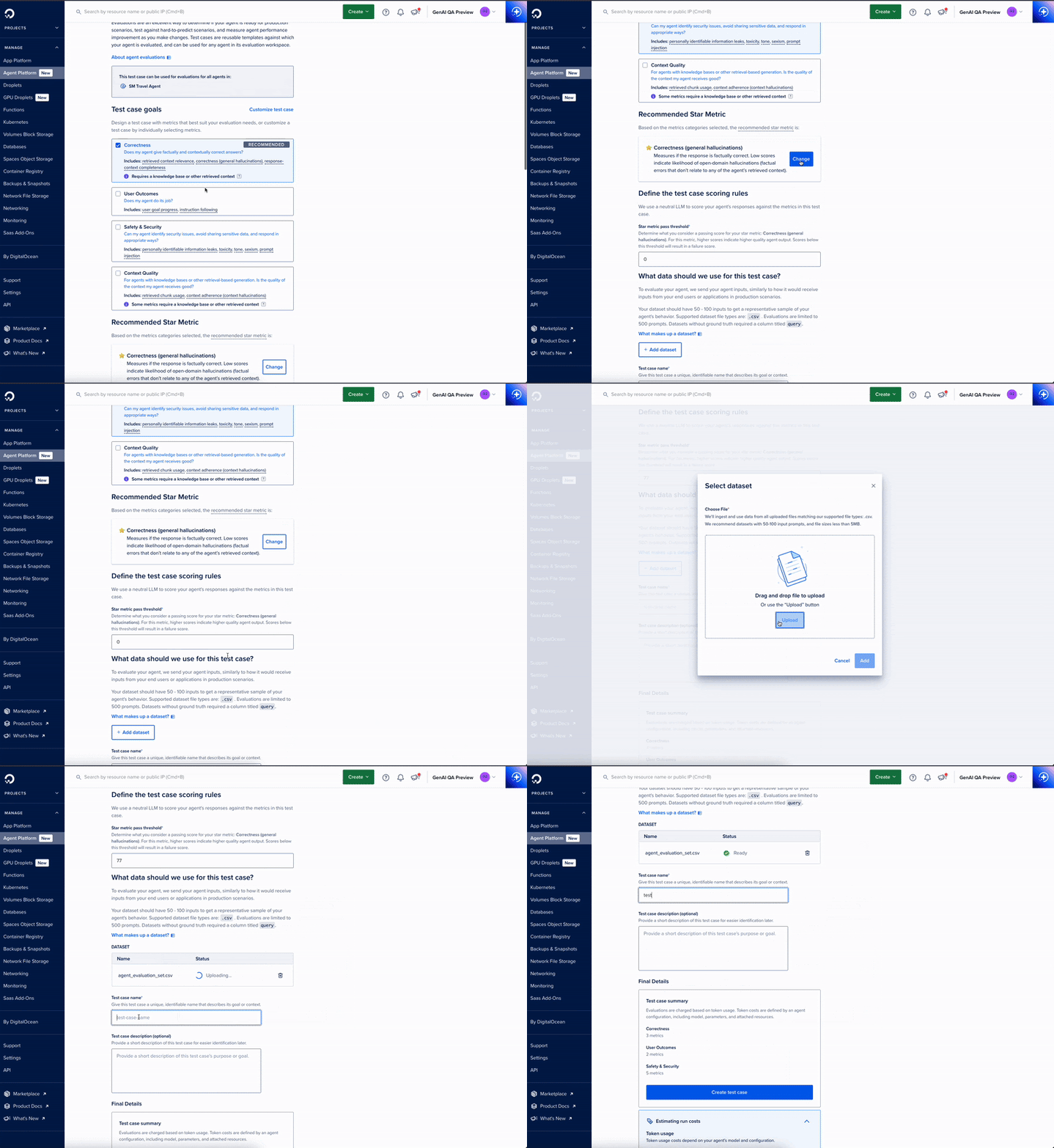
- Goal-oriented metric grouping: Metrics are now organized into intuitive, goal-oriented groups such as Safety & Security, Correctness, and RAG Performance. The Safety & Security group is preselected to help developers get started quickly and confidently.
- Example datasets: A list of example data sets are now available for common evaluations. This allows developers to create their own datasets quickly and efficiently.
- Clear, persistent error messaging: Upload errors are now clear, persistent, and specific, with messages like “Validation Error: ‘query’ column is missing”. Developers can easily understand and fix issues, reducing friction in the testing process.
- Interpretable results with trace integration: Results are organized by the same metric groups used in setup, with tooltips to explain each metric and its scoring. Deep integration with observability tools allows developers to jump directly from a low score to the full trace for fast debugging and improvement.
Why you should use evaluations
Evaluations help you test and improve your AI agents systematically, making it easier to identify issues and optimize performance. For those just getting started, the preselected Safety & Security metrics and dataset examples let you quickly check for common issues like unsafe or biased outputs, giving greater confidence in your agent’s behavior.
For those scaling their agents, custom test cases, specialized metric groups like RAG Performance, and the ability to upload your own datasets provide deeper insights into agent performance. With trace integration, you can drill down into low scores to debug and improve your agent with precision. Evaluations make it faster to turn results into actionable improvements, helping developers at any stage build safer, more reliable AI agents.
How to get started with agent evaluations
Ready to put your agents to the test? Getting started with evaluations in the DigitalOcean Gradient™ AI Platform is simple.
- Open your agent’s evaluations tab in the Cloud Console.
- Create a new test case and give it a name. Pro tip: use a unique, descriptive name that reflects the goal or context—it’ll make it easier to find later.
- Select the metric(s) you want to evaluate, focusing on the qualities that matter most to your agent.
- Choose a dataset. To create your own, review the examples in the documentation to create a CSV file quickly.
- Run the evaluation and review your results. Use the trace integration to explore any low scores and debug your agent efficiently.
For a step-by-step walkthrough, check out our tutorial, which guides you through creating test cases, selecting metrics, and interpreting evaluation results.
Take control of your AI’s performance, start evaluating your agents today to identify issues, optimize behavior, and deliver reliable, production-ready systems faster than ever.
About the author

Related Articles

DigitalOcean Inference Router, Now Cache-Aware: Why the Cheapest Model Isn't Always the Best Deal
Salman Paracha
- August 20, 2026
- 10 min read

Upcoming GPU Pricing Updates
- July 21, 2026
- 2 min read
Scale Faster with Managed Weaviate: Now in Public Preview on DigitalOcean
- July 9, 2026
- 4 min read